
 Text Tools
 Image Tools
 CSS Tools
 Coding Tools
 Color Tools
 Social Media Tools
 Miscellaneous Tools
 Add to Chrome
 Add to Firefox
Drag your SVG here, or click to browse
Upload an SVG file to convert strokes to fills
Similar Image Tools
See All


What is Online SVG Stroke to Fill Converter?
SVG Stroke to Fill Converter is a free online tool that converts SVG stroke elements to fill elements. If you have ever exported an SVG icon from Figma or Illustrator and noticed it looks different in the browser, or it looks weird when you scale it up, chances are it is a stroke problem. Strokes in SVGs don't always behave the same way across different browsers, devices, and design tools. Converting them to fills fixes this.
The main issue with SVG strokes is scaling. When you resize an SVG that uses strokes, the stroke width scales proportionally too, which can make lines look too thick or too thin depending on the size. Fills don't have this problem — they are just shapes, and shapes scale exactly as you'd expect. On top of that, different browsers handle stroke-linecap, stroke-linejoin, and stroke-dasharray slightly differently, which leads to those annoying inconsistencies.
This tool uses the oslllo-svg-fixer library under the hood. It takes each path in your SVG that uses strokes and converts it into an equivalent filled path. The visual result looks the same, but the underlying SVG code is much more reliable across platforms.
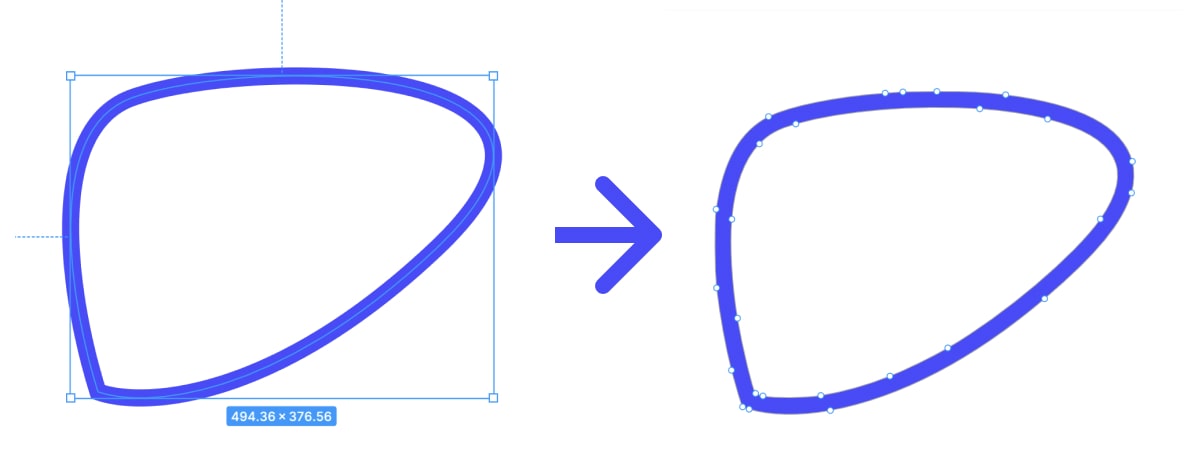
SVG Stroke to Fill Conversion - Before & After
When Do You Need This?
You probably need this tool if you are dealing with any of these situations:
- Your SVG icons look different sizes or thicknesses at different screen sizes
- The same SVG looks fine in Chrome but slightly off in Safari or Firefox
- You are building an icon library and want consistent rendering everywhere
- Your SVGs look wrong when imported into a mobile app framework like React Native or Flutter
- You are sending SVGs to a print shop and they told you to convert strokes to outlines
- Animated SVGs are behaving weirdly because of stroke properties
In design tools like Illustrator, this is called "Outline Stroke" or "Expand Stroke". It is the same concept — you are turning a line with a width into a filled shape. The difference is that this tool does it for SVG code directly, without needing to open a design application.
The converter handles all the standard SVG stroke properties — stroke-width, stroke-linecap, stroke-linejoin, stroke-dasharray, you name it. It works with paths, circles, rectangles, ellipses, polylines, and polygons. All other SVG attributes like colors, gradients, opacity, and the viewBox are preserved as they are.
How to use Online SVG Stroke to Fill Converter?
Converting your SVG is simple.
- Upload your SVG file by dragging it into the upload area or clicking to browse.
- The tool will automatically convert all strokes to fills. You can see the result in the preview.
- Download the converted SVG or copy the SVG code directly to your clipboard.
The converted file will look exactly the same as the original, but it will render consistently no matter where you use it. For very complex SVGs with lots of paths, the conversion might take a second or two longer.