 Text Tools
 Image Tools
 PDF Tools
 CSS Tools
 Coding Tools
 Social Media Tools
 Color Tools
 Security Tools
 Miscellaneous Tools
 Add to Chrome
 Add to Firefox
No limits, no signup — the file is opened by your browser, not uploaded
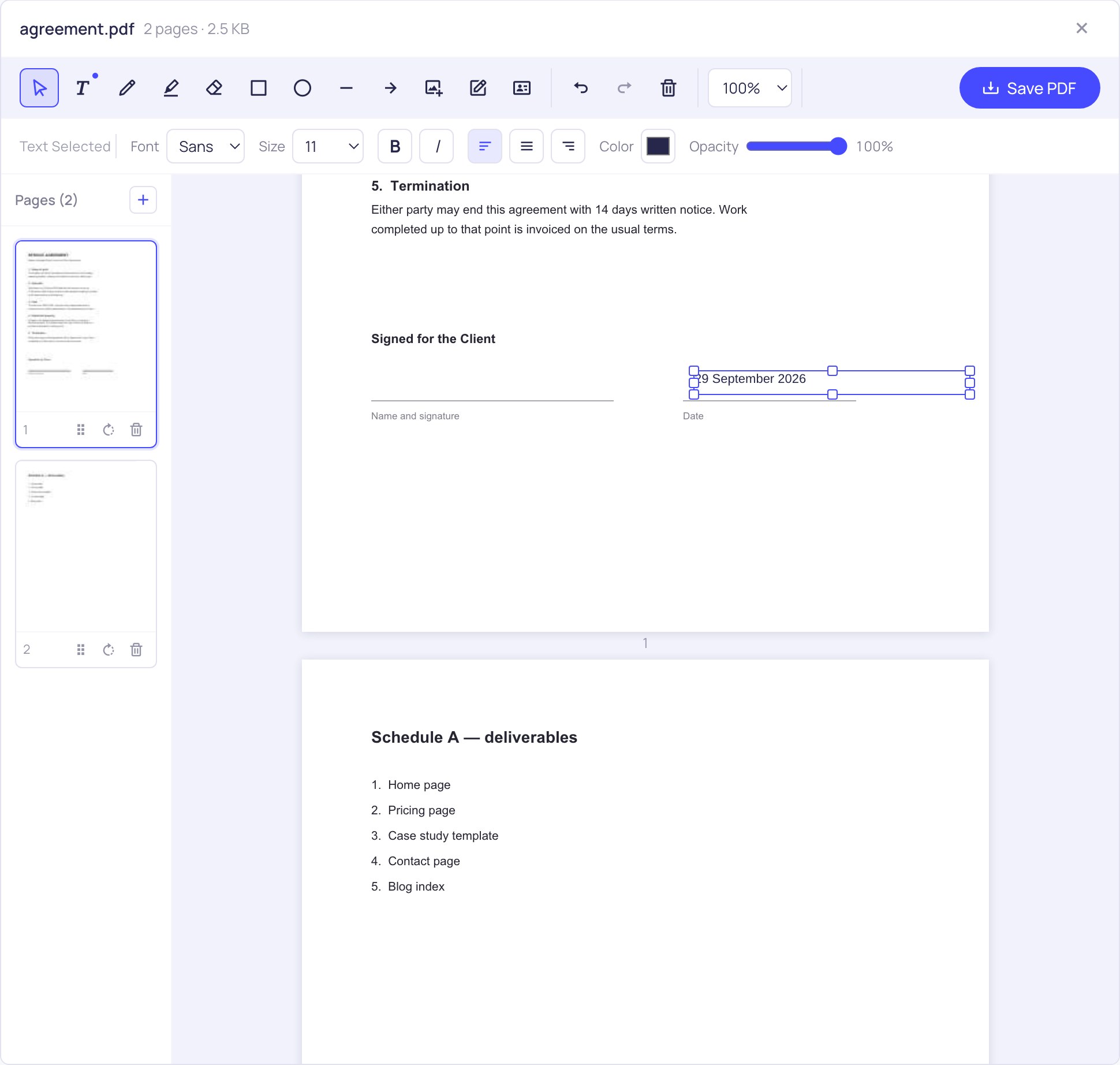
Open a PDF, click anywhere on the page and start typing. Font, size, colour and alignment are in the bar above the page.
Similar PDF Tools
What is Online Add Text to PDF?
Click the spot on the page where the words should go, and type. That is the whole interaction. The text becomes part of the PDF when you save, exactly where you put it, in the font and size you chose.
People reach for this for small, specific jobs: writing an answer onto a form that has no fillable fields, adding a note for a colleague in the margin, putting a date and a reference number on an invoice, labelling a diagram, or writing the correction after covering something up.
Controlling how the text looks
- Three typefaces — a sans, a serif and a monospace. They are metrically matched to Helvetica, Times and Courier, the faces most PDFs are already set in, so a line you add sits at the same width and weight as the text around it instead of standing out.
- Sizes from 8 to 64 pt — the same numbers you would pick in a word processor, measured against a standard A4 or Letter page.
- Bold, italic and alignment — real bold and italic cuts of the typeface, not a slanted or smeared approximation of the regular one.
- Colour and opacity — black to match printed text, blue to make an addition obviously an addition, or something faint for a watermark-style note.
Everything you type stays editable while you work: click it again to change the wording, drag it to move it, resize it from a corner. It is only written into the page when you save.
Accents, Turkish, Greek and Cyrillic actually work
This is where a lot of free tools quietly fall over. The fonts built into the PDF format cover Latin-1 and nothing else — 218 characters. So ö and ü survive, but ğ, ş and ı do not, and neither does anything Polish, Czech, Greek or Russian. Tools that rely on those built-in fonts either write a question mark in place of the character or fail at the last step.
Here the text is embedded with a real font that covers Latin Extended A and B, Greek and Cyrillic, and only the glyphs you actually used are written into the file, so coverage does not cost you file size. What appears on screen while you type is rendered from the very same font file that gets embedded — so what you see is genuinely what you get, not a preview that shifts when the PDF opens somewhere else.
Right-to-left and complex scripts — Arabic, Hebrew, Devanagari — are not supported, because correct output there needs bidirectional reordering and glyph shaping that this pipeline does not do. Rather than silently writing blanks, the editor tells you which characters it cannot set.
What this does not do
It adds new text. It does not let you click into a paragraph that is already in the PDF and retype it — that is a different and much harder problem, because the original font may not be embedded, and a longer replacement has nowhere to reflow to.
The practical workaround, and what most people actually do, is to cover the old line and type the new one over it. For anything longer than a line or two, editing the source document and exporting a new PDF will always give a better result than patching the output.
Frequently asked questions
Can I edit the text that is already in the PDF?
No. You can add text on top of it, and you can white out a line and type a replacement, but existing paragraphs cannot be clicked into and rewritten.
Will the text I add be selectable and searchable?
Yes. It is written as real text with an embedded font, not as a picture of text, so it can be selected, copied and found with Ctrl+F like the rest of the document.
Can I match the font the document already uses?
Usually close enough to pass. The sans, serif and mono faces share their metrics with Helvetica, Times and Courier, which covers most business documents. An unusual branded typeface will not match exactly.
Do Turkish characters like ğ and ş come out correctly?
Yes, along with Polish, Czech, Greek and Cyrillic. This is deliberate rather than incidental — the fonts are embedded specifically so these characters survive instead of becoming question marks.
Is there a page limit or a daily limit?
Neither. Your machine's memory is the only ceiling, and the file is never uploaded, so there is no server-side quota to run into.
Can I do more than type on the page?
Yes — the same toolbar holds highlighting, drawing, shapes, images, signatures and page reordering. The full description is on the PDF Editor page.