 Text Tools
 Image Tools
 PDF Tools
 CSS Tools
 Coding Tools
 Social Media Tools
 Color Tools
 Security Tools
 Miscellaneous Tools
 Add to Chrome
 Add to Firefox
No limits, no signup — the file is opened by your browser, not uploaded
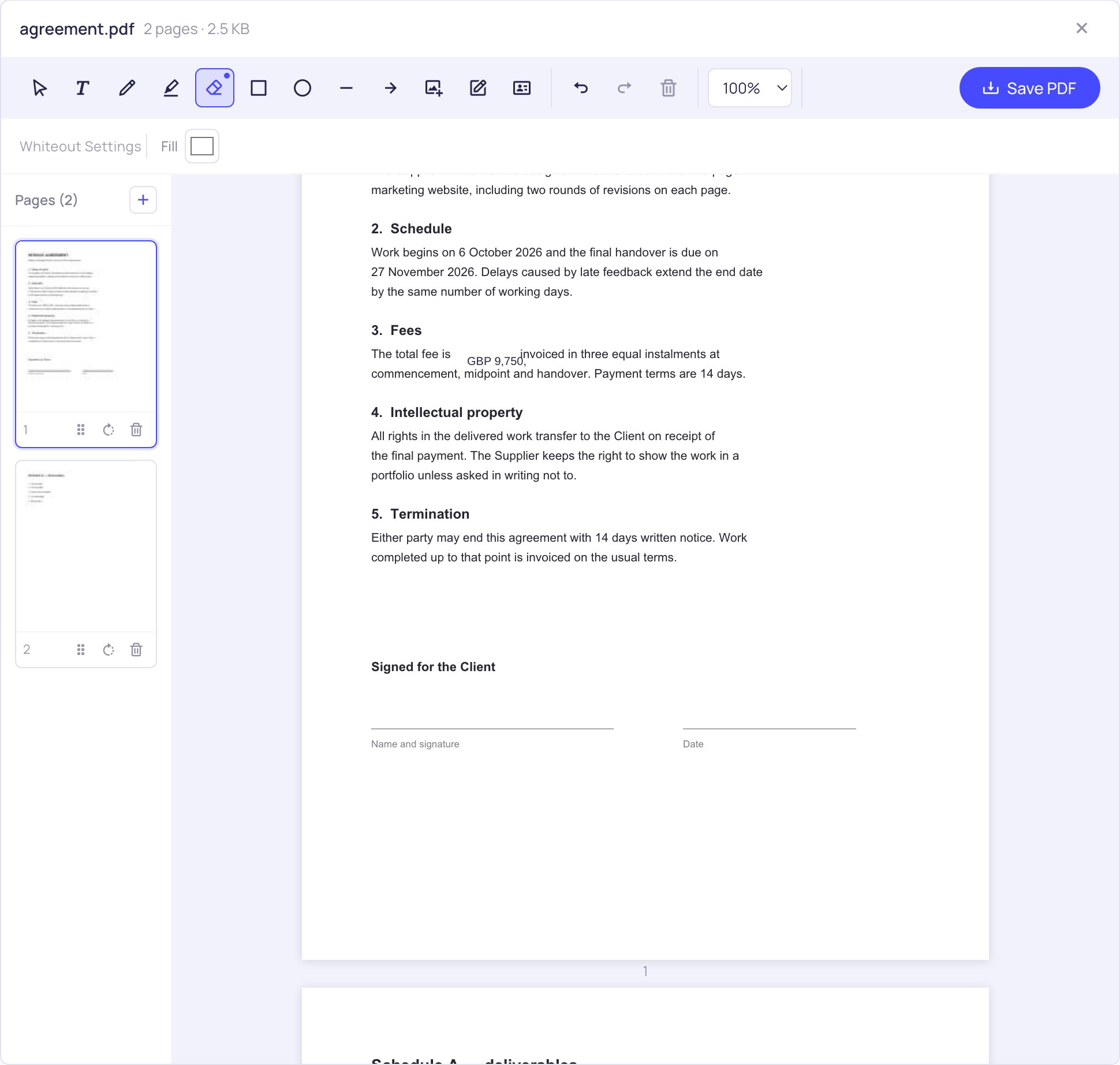
Open a PDF and drag a box over anything that should go. Set the block colour to match the page, then type the correction over it with the Text tool.
Similar PDF Tools
What is Online Whiteout PDF?
The digital version of correction fluid. You drag a box over the part of the page that should not be there, and it disappears behind an opaque block. Then you type the right thing over the top, or leave the gap blank.
It is the quickest fix for the everyday problems that do not justify rebuilding a document: a stale price on a quotation, last year's date in a template, a previous tenant's name on a form, a phone number that changed, a paragraph that should not go to this particular recipient. Especially useful when the original file is a Word document you no longer have, or a PDF somebody else produced.
Cover, then correct
- Open the PDF and drag a box across whatever should go. It is covered the moment you release, and you can nudge or resize the box afterwards until the edges sit where you want them.
- Not every page is white. If you are covering something on a coloured background, a shaded table row or a letterhead band, set the block colour to match and the patch stops being visible.
- Type the replacement over the covered area with the text tool, matching the surrounding size so the correction does not announce itself.
Nothing about this is destructive to the rest of the page. Everything else — the layout, the fonts, the images, the other pages — stays exactly as it was, because the block is drawn onto the page rather than the document being rebuilt around it.
This covers text. It does not redact it.
This is the part most tools do not tell you, so here it is plainly: whiting something out hides it visually, it does not remove it from the file. The characters underneath are still in the PDF's content. Somebody who selects across the area and copies, or runs the file through a text extractor, can still read what you covered.
For an out-of-date price or a wrong date, that is completely fine — nobody is trying to recover it. For a national insurance number, a bank account, a medical detail or a name that must not reach the recipient, it is not fine, and a black box gives a false sense of safety. Real redaction means deleting the text from the content stream, which is a different operation from drawing over it.
If the information genuinely must be unrecoverable, the dependable route is to remove it in the source document and export a fresh PDF. Failing that, printing the whited-out file and scanning it back does work, because the scan is a picture with no text layer left — clumsy, but honest about what it is.
Frequently asked questions
Can the covered text be recovered?
Yes, by anyone who copies the text out of the PDF. The block sits on top of the characters; it does not delete them. Use this for corrections, not for secrets.
Is this the same as redacting a PDF?
No, and the distinction matters. Redaction removes the underlying content; whiteout conceals it. Most "redact PDF" features in free online tools are actually whiteout with a black block, which is why documents get published with recoverable text under the black bars fairly regularly.
My page is not white. Can I still cover something?
Yes — the block colour is adjustable, so you can match a grey table row, a coloured header or a tinted background instead of leaving a white rectangle where it does not belong.
Can I type a replacement over the covered area?
Yes, and that is the usual reason to cover something in the first place. The text tool puts new text anywhere on the page, with a choice of font, size and colour so the correction blends in.
Does covering text change anything else in the document?
No. The block is added to the page and everything else is left untouched — same pagination, same fonts, same images. The file you download is the original with your changes drawn in.
Is the file uploaded anywhere?
No. It is opened and saved by your browser. Given the sort of thing people cover up, sending the document to a server first would rather defeat the purpose.