
 Text Tools
 Image Tools
 PDF Tools
 Social Media Tools
 Security Tools
 Coding Tools
 CSS Tools
 Color Tools
 Miscellaneous Tools
 Add to Chrome
 Add to Firefox
Combines any number of PDFs and drops the pages you deselect, copying every page across untouched.
Drag your file here, or click to browse
Upload PDF files to merge
No PDFs uploaded yet
Upload two or more PDF files to get started. You can reorder files, select individual pages, and merge them into a single document.
100% private — files never leave your browser
Drag and drop to reorder pages
Select or unselect individual pages
Similar PDF Tools
See All



What is Online PDF Merger?
You have five separate PDF files that need to be one document. Maybe it is a contract split across multiple scans, a presentation assembled from different sources, or a collection of invoices that need to go into a single report. Whatever the case, merging PDFs should not require installing desktop software or uploading your files to some random server.
This free online PDF merger runs entirely in your browser. Your files never leave your device — everything is processed locally using client-side JavaScript. Upload your PDFs, drag them into the order you want, pick which pages to include, and hit merge. That is it.
Unlike most online PDF tools that upload your documents to their servers (and who knows what happens to them after that), this tool processes everything on your machine. The moment you close the tab, the data is gone. No accounts, no file size limits imposed by a server, no waiting for uploads and downloads.
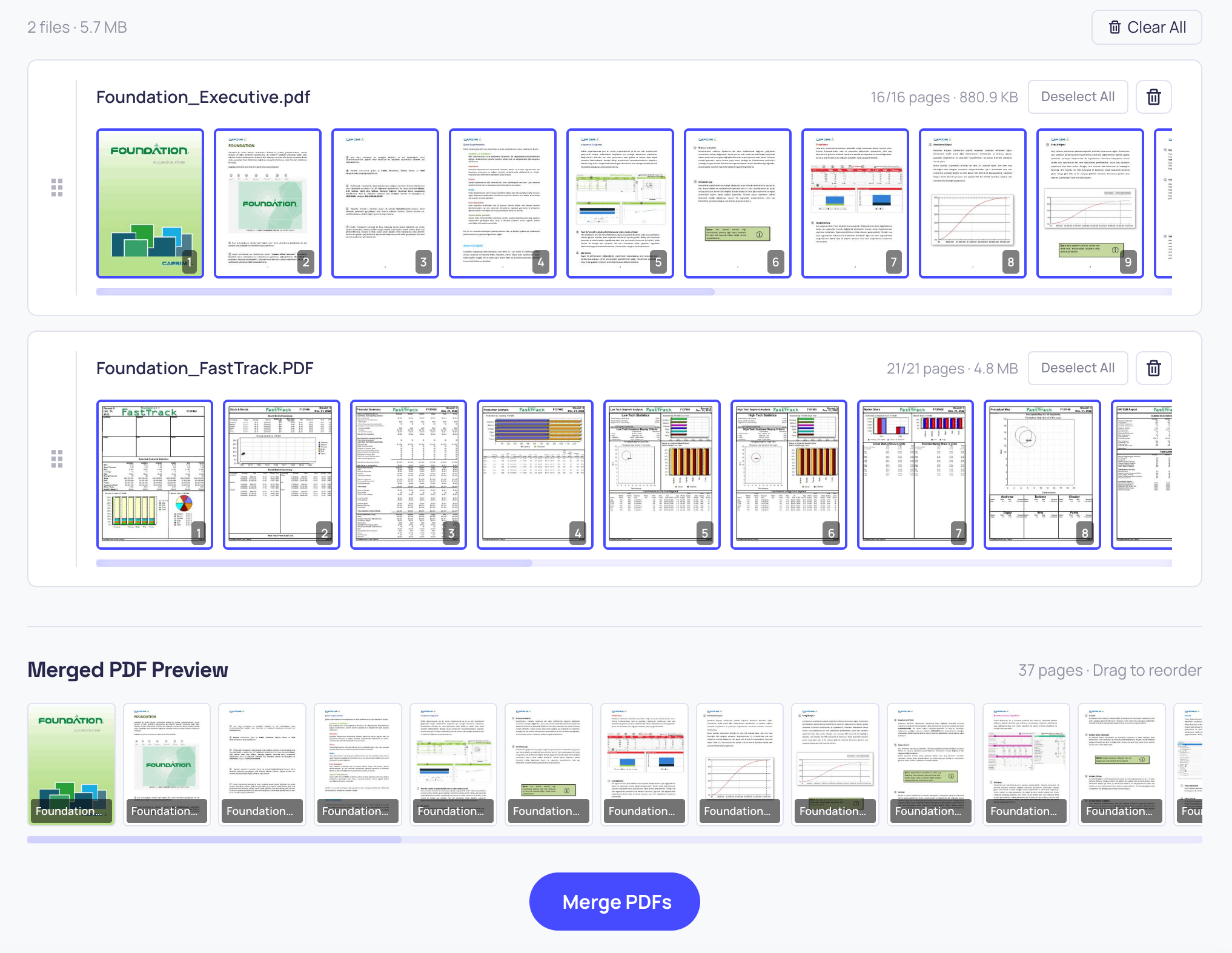
Merging multiple PDF files into one document with the PDF Merger tool
How to use Online PDF Merger?
Merging your PDFs takes about 30 seconds:
- Upload your PDF files by dropping them into the upload area or clicking to browse. You can select multiple files at once.
- Each PDF appears as a card showing the filename, page count, file size, and thumbnail previews of every page.
- Drag the cards to reorder the PDFs. Use the grip handle on the left side of each card.
- Click on any page thumbnail to unselect it if you do not want it in the final document. Click again to reselect. You can also use the "Select All" and "Deselect All" buttons.
- Check the merge preview at the bottom — it shows all selected pages in the final order. You can drag pages horizontally here too for fine-grained control.
- Hit "Merge PDFs" to combine everything into a single file. The merged PDF downloads automatically.
More Than Just Merging
While the main purpose is to combine PDF files, the page selection and reordering features make this tool useful for a bunch of related tasks that people often search for separately:
- Sort PDF pages — Rearrange pages in any order you want by dragging them in the merge preview. If your scanned document came out in the wrong order, just drag the pages into the right sequence.
- Order PDF files — Got a pile of PDFs that need to be combined in a specific sequence? Drag the file cards up and down to set the correct order before merging.
- Remove blank pages from PDF — See a blank or unwanted page in the preview? Just click on it to unselect it. It will not be included in the merged output. This is handy for cleaning up scanned documents where the scanner picked up empty pages.
- Extract specific pages from PDF — Only need pages 3, 7, and 12 from a 50-page document? Upload it, deselect everything with "Deselect All", then click only the pages you want. Merge and you have got a new PDF with just those pages.
- Combine different document sections — Need the first two pages from one PDF, the middle section from another, and the last page from a third? Upload all three, select only the pages you need from each, arrange them in the merge preview, and combine.
What merging cannot do is change what is printed on the page. If you also need to write on the document, highlight a paragraph, fill in a form or sign it, the PDF Editor does all of that and can pull in pages from another PDF while you are there — so you do not have to merge here and annotate somewhere else.
Features
- 100% client-side — Your files never leave your browser. No uploads, no servers, complete privacy.
- Drag-and-drop reordering — Rearrange PDFs and individual pages by dragging them.
- Page selection — Click any page to include or exclude it from the merged output. Use Select All / Deselect All for bulk control.
- Visual preview — See thumbnail previews of every page before merging.
- Multiple file upload — Select and upload several PDFs at once.
- No file size limits — Since processing happens locally, there are no server-imposed limits.
- No signup required — Just upload, arrange, and merge.
Frequently asked questions
How many files can I merge at once?
As many as your machine can hold open. There is no file count, no page cap and no daily limit, because the merging happens on your computer rather than on a server we would have to pay for.
Can I leave pages out?
Yes. Every page appears as a thumbnail and clicking one removes it from the output. Deselect everything and then pick only the pages you want, and the merge becomes an extract instead.
Will the merged file look the same as the originals?
Yes. The pages are copied across as they are, so fonts, images and layout survive intact. Nothing is re-rendered or recompressed.
Is my document uploaded anywhere?
No. The files are opened and written by your browser. Close the tab and the data is gone — there is nothing on a server to delete.
Can I reorder the pages as well as the files?
Both. Drag the file cards to set the order of the documents, and drag individual pages in the preview strip for finer control.
What if I need to change what is on the page?
Merging only decides which pages end up where. To write on them, sign them or fill in a form, use the PDF Editor — it can also pull in pages from another PDF while you are there.