 Text Tools
 Image Tools
 PDF Tools
 Social Media Tools
 Security Tools
 Coding Tools
 CSS Tools
 Color Tools
 Miscellaneous Tools
 Add to Chrome
 Add to Firefox
Builds Instagram comments and replies with verified badges and like counts, in light or dark mode, and downloads them as a PNG.
Appearance
Comments
What is Online Instagram Comment Generator?
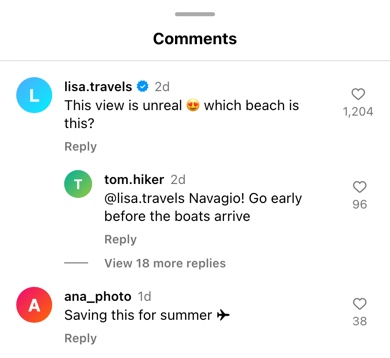
Instagram Comment Generator is a free tool for making Instagram comments as an image. It draws the comments sheet from the Instagram app — the bar at the top, each comment with its username, blue verified badge, time and text, the heart and like count on the right, Reply and "See translation" underneath, and replies indented under the comment they answer.
It is built for the jobs a real screenshot is bad at: showing a comment that has not been written yet, keeping a stranger's name and face out of a presentation, or putting a set of comments in exactly the order you want them.
How Instagram Lays Out a Comment
Instagram keeps comments compact. The username is bold and the time sits right next to it in grey, shortened to a number and a letter — 2d, 5h, 3w. The like count is not under the comment any more but under the heart on the right, and a comment with replies gets a short line and "View 18 more replies" beneath it. The verified badge is the blue scalloped one Instagram uses everywhere, not a plain tick. Getting those small things right is what makes the result read as Instagram rather than as a generic comment.
Who Uses It
- Social media managers planning a giveaway or a campaign, who want to show a client what a "comment to win" post will look like once people start answering.
- Designers building app screens, pitch decks and case studies that need realistic comments without real people in them.
- Teachers and trainers running sessions on online safety or community management, with example comments that can be discussed without pointing at anyone.
- Video creators who show a comment on screen, using the transparent background to lay it over footage.
How to use Online Instagram Comment Generator?
- Choose light or dark mode, and whether to show the Comments bar at the top.
- Edit each comment: username, avatar, time and text, and the number of likes shown under the heart.
- Tick "Verified" for the blue badge, "Liked" for a red heart, or "See Translation" for that link under the comment.
- Add replies with "+ Add Reply", and type a number in "Hidden Replies" to show "View more replies" under a comment.
- Click "Export Comments" to download a PNG or copy it to the clipboard.
Frequently asked questions
Can I use generated comments in an ad?
Not as if they were real. Showing invented comments as genuine customer feedback is a fake testimonial, and in the United States the FTC's rule on fake reviews and testimonials, in force since October 2024, allows fines for exactly that. Using them in an internal mockup, a pitch, or an ad that is clearly a dramatisation is a different matter.
How do I make a reply to a comment?
Click "+ Add Reply", or tick "Reply to Above" on any comment except the first. The reply is indented under the comment above it with a smaller avatar. Starting the reply with @username, as Instagram does, makes it clear who is being answered.
Does it have dark mode?
Yes. Dark mode uses the dark grey of Instagram's comments sheet with light text, and the verified badge and liked heart keep their colours as they do in the app.
What size is the image?
It is drawn at the width of a phone screen and exported at 780 pixels wide; the height follows the number of comments. That is sharp enough for a slide, a story or a post.
Is it connected to my Instagram account?
No. There is nothing to log in to and nothing is posted. The comments and the avatars you upload stay in your browser.
Usage Policy
Generated comments are for mockups, lessons and jokes everyone is in on. By using Instagram Comment Generator by 10015.io you agree not to put them under a real person's or brand's name as if they wrote them, not to present them as genuine reviews or testimonials, and not to use them to bully anyone. 10015.io is not responsible for the images people make.