 Text Tools
 Image Tools
 PDF Tools
 Social Media Tools
 Security Tools
 Coding Tools
 CSS Tools
 Color Tools
 Miscellaneous Tools
 Add to Chrome
 Add to Firefox
Builds a Facebook post with reactions, comments and shares, a photo or a coloured text background, and downloads it as a PNG.
Author
Post
Engagement
Appearance
What is Online Facebook Post Generator?
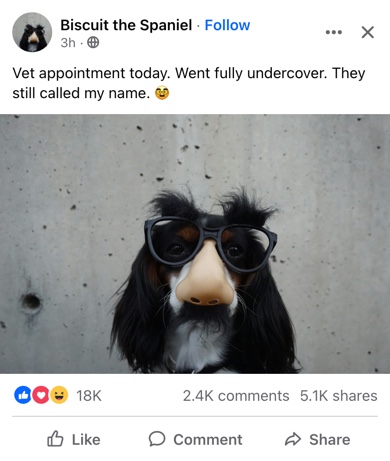
Facebook Post Generator is a free tool for making a Facebook post as an image. It draws a post the way it appears in the Facebook app's feed: profile picture and name, the time and the little icon that says who can see it, the post itself, the row of reaction icons with the comment and share counts, and the Like, Comment and Share buttons underneath.
Most of the people who need a Facebook post that has not been published are working on one: a social media manager getting a client to sign off on wording, an agency putting a campaign into a deck, a small business deciding between two announcements. Others want it for a report, a lesson on spotting fake news, or a joke.
How Facebook Lays Out a Post
- Short posts are set large. When a post is only a line or two of text with no photo, Facebook shows it in much bigger type than a long one. The generator does the same automatically, so a short status looks the way it would in the feed.
- Coloured backgrounds. Short text can also go on a coloured card, a feature Facebook added for status updates in 2016. Pick one of six backgrounds and the text turns white, bold and centred.
- Who can see it. The icon after the time is the audience: a globe for Public, two people for Friends, a padlock for Only Me.
- Reactions. Facebook shows up to three reaction icons, the most common ones on the post, followed by the total. Like, Love, Care, Haha and Wow are available, alone or together.
- Pages and public figures. The blue badge next to the name, and a blue "Follow" after it for accounts you do not follow yet.
How to use Online Facebook Post Generator?
- Set the author: name, profile picture, time, audience, and the verified badge or Follow link if you need them.
- Write the post. Keep it short for large text, choose a text background for a coloured card, or add a photo.
- Choose the reactions and fill in the reaction, comment and share counts. Leave a count empty to hide it.
- Tick "Liked by You" for the blue Like button, and pick light or dark mode.
- Click "Export Post" to download a PNG or copy it to the clipboard.
Frequently asked questions
Why did my text suddenly get bigger?
Because it got shorter. Facebook enlarges text-only posts of up to about 85 characters, and the generator follows the same rule. Add a photo or write a little more and it returns to the normal size.
Can I use the Sad and Angry reactions?
Not yet. Like, Love, Care, Haha and Wow are included, in the combinations that appear most often. Sad and Angry are the next ones to add.
Can I show a post with a photo?
Yes. Upload a photo and it appears under the text across the full width of the post, as in the app. The photo option is hidden while a text background is selected, since Facebook does not allow both on the same post.
What size is the downloaded image?
The post is drawn at the width of a phone screen and exported at twice that, 780 pixels wide. The height depends on the text and the photo.
Does it publish anything on Facebook?
No. It has no connection to Facebook or Meta and needs no login. For a story instead of a post use the Facebook Story Generator, and for the replies under a post the Facebook Comment Generator.
Usage Policy
A fake post that people believe is how a rumour starts, and Facebook is where many of them spread. By using Facebook Post Generator by 10015.io you agree not to make posts that appear to come from a real person, business or organisation in order to mislead, not to fabricate statements, announcements or news, and not to use the tool to harass anyone. Drafts, mockups, lessons and jokes everyone is in on are fine. 10015.io is not responsible for the images made with it.