 Text Tools
 Image Tools
 PDF Tools
 Social Media Tools
 Security Tools
 Coding Tools
 CSS Tools
 Color Tools
 Miscellaneous Tools
 Add to Chrome
 Add to Firefox
Builds a LinkedIn feed post for a person or a company page, with reactions, comments and reposts, as a PNG.
Author
Post
Engagement
What is Online LinkedIn Post Generator?
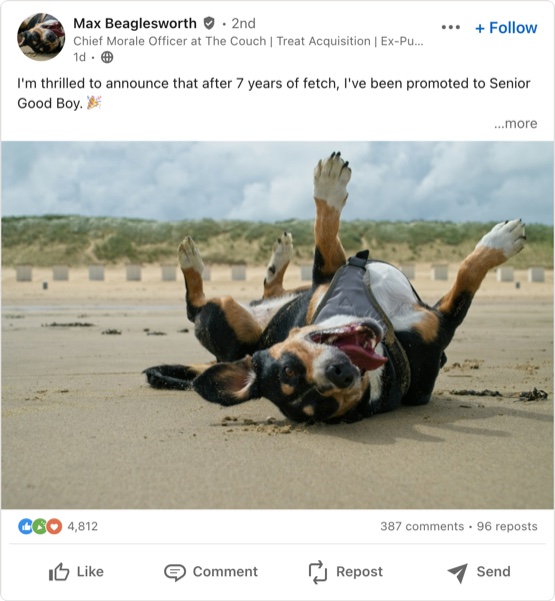
LinkedIn Post Generator is a free tool for making a LinkedIn post as an image, the way it appears in the LinkedIn feed on a computer. It draws the whole card: profile photo, name, connection degree and verification badge, the headline under the name, the time and visibility, the "+ Follow" button, the post with LinkedIn's "…more" cut, an image, the reaction icons and counts, and the Like, Comment, Repost and Send buttons.
On LinkedIn most people want a mockup rather than a prank. Social media and content teams use it to show a draft to a manager or a client before it goes live, recruiters and employer-brand teams to plan announcements, and agencies to put realistic posts into a pitch deck or a case study. It is also a good way to see whether a post's opening lines are strong enough, because on LinkedIn they are all most people will read.
The First Three Lines
LinkedIn shows roughly the first three lines of a post in the feed and hides the rest behind "…more". Whatever is above that cut has to earn the click, which is why so many LinkedIn posts open with one short, punchy sentence and a line break. Leave "Cut After 3 Lines" on to see your draft exactly as a scrolling reader would, and turn it off to show the whole post. LinkedIn allows up to 3,000 characters, and the tool takes the same.
People, Pages and Reactions
- Person or company. A personal post has a round photo, a headline and a connection degree — 1st, 2nd or 3rd+ — after the name. A company page has a square logo and its follower count instead.
- Verification. The small shield after the name that LinkedIn shows on verified profiles and pages.
- Six reactions. Like, Celebrate, Support, Love, Insightful and Funny. Only the three most common on a post are shown before the number of reactions, so pick the combination that fits: Celebrate for a new job, Insightful for a thought-leadership post, Funny for the rare joke.
- Comments and reposts. Shown on the right as "213 comments • 18 reposts". Leave either empty to hide it.
- Hashtags and mentions. Set in LinkedIn blue automatically, as they are in the feed.
How to use Online LinkedIn Post Generator?
- Choose a person or a company page, then fill in the name, photo or logo, and the headline or follower count.
- Set the connection degree, the time, who can see the post, and whether to show the verification badge, "Edited" and "+ Follow".
- Write the post and add an image if it has one. Decide whether to cut it after three lines.
- Under Engagement, choose which reaction icons appear and how many people reacted, commented and reposted. "Liked by You" colours your own Like button.
- Switch between LinkedIn's light and dark themes, then use "Export Post" to save a PNG or copy the card straight into a slide.
Frequently asked questions
Where does LinkedIn cut a post with "…more"?
After about three lines in the feed, a little more on a wide screen and a little less on a phone. The mockup cuts at three lines of the desktop feed, which is a safe guide: if the hook is in the first two lines, it survives everywhere.
Can I make a post from a company page?
Yes. Switch "Account" to Company Page: the photo becomes a square logo, the connection degree disappears, and the line under the name is used for the follower count, as on LinkedIn.
Does it look like the LinkedIn app on a phone?
It follows the desktop feed, which is what most people screenshot for presentations and reports. The parts are the same in the app, laid out a little more tightly.
What size is the image?
The card is 555 pixels wide, the width of the LinkedIn feed, and is exported at twice that, 1110 pixels, so it stays sharp on a slide. How tall it is comes down to the length of the post and whether it has a picture.
Does it post anything to LinkedIn?
No. There is no connection to LinkedIn and no login; the photos you add stay in your browser. For other networks, see the Facebook Post Generator and the Tweet Generator.
Usage Policy
LinkedIn is where people's professional reputations live, so a fake post can cost someone a job or a client. Using LinkedIn Post Generator by 10015.io means agreeing not to put words in the mouth of a real professional or employer, not to invent job offers, endorsements or company news, and not to show a mockup to anyone as though it had really been published. Drafts, mockups, training material and obvious parody are what the tool is for, and 10015.io accepts no responsibility for what people make with it.