 Text Tools
 Image Tools
 PDF Tools
 Social Media Tools
 Security Tools
 Coding Tools
 CSS Tools
 Color Tools
 Miscellaneous Tools
 Add to Chrome
 Add to Firefox
Puts Snapchat's caption bar on any photo, wherever you drag it, and downloads it as a 1080 × 1920 snap.
Photo
Caption
What is Online Snapchat Caption Maker?
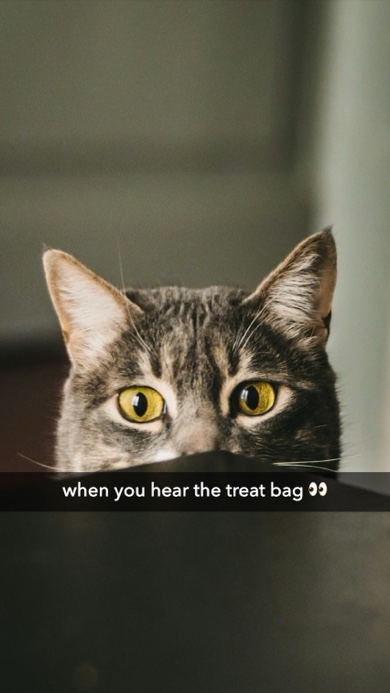
Snapchat Caption Maker is a free tool that adds a Snapchat-style caption to any photo. Upload a picture, type a line, and it lays the familiar caption over it: a translucent black strip across the full width of the image with white text in the middle. Drag the picture up or down to move the strip, exactly as you would in Snapchat, and download the result.
It is not a screenshot of the app — there are no buttons, timers or usernames — just your photo with a caption on it, which is the whole point. The Snapchat caption has become a meme format of its own, pasted onto pictures that were never on Snapchat, and this is the quickest way to make one from a photo already on your phone or computer.
Classic Bar and Big Text
Snapchat's text tool cycles through a few styles each time you tap it. The two that matter for captions are here:
- Classic Bar — the original Snapchat caption. Medium-weight white text on a see-through black band that stretches from edge to edge. You can make the band lighter or darker.
- Big Text — large, bold white letters with a soft shadow and no band, for when the caption is the joke.
Both are sized in proportion to the snap — the classic caption's text is about the same share of the width as in Snapchat itself.
Always the Shape of a Snap
Whatever photo you start with — portrait, landscape or square — the result is a 1080 × 1920 picture, the size and 9:16 shape of a snap. "Fill" crops the photo so it covers the whole screen, the way Snapchat shows a full-screen snap; "Fit" keeps all of it and adds black bars, which is what Snapchat does with a landscape photo from your camera roll. The photo is processed in your browser and never sent anywhere.
How to use Online Snapchat Caption Maker?
- Upload a photo. JPG, PNG and WebP all work.
- Type the caption. Emoji are fine, as they are in Snapchat.
- Drag the picture up or down to place the caption, or use the position slider.
- Pick Classic Bar or Big Text, the text size and, for the bar, how dark it is. Choose whether the photo fills the snap or fits inside it.
- Click "Export Photo" to download a JPG or copy the image to paste it straight into a chat.
Frequently asked questions
Do I need the Snapchat app?
No. The caption is added here, in the browser, so it works on a computer as well as a phone, and on photos that were never in Snapchat.
How do I move the caption?
Press on the picture and drag up or down — the strip follows your finger or mouse, the way it does in Snapchat. The position slider underneath does the same thing more precisely.
Can a caption be on more than one line?
Yes. A caption too long for the width wraps onto a second line and the band grows to fit it. Snapchat captions are usually a single line, so shorter reads more like the real thing.
What size is the downloaded picture?
Always 1080 × 1920 pixels, the resolution of a snap, so it looks right when posted to a story or sent in a chat. A landscape or square photo is cropped to fill that frame, or shown whole with black bars if you choose "Fit".
What else can I make like this?
For a whole story screen rather than a caption, the Instagram Story Generator and Facebook Story Generator draw the full viewer, and the Image Caption Generator can suggest what to write.
Usage Policy
Captioned photos are for memes, jokes and your own pictures. By using Snapchat Caption Maker by 10015.io you agree not to caption photos of real people in ways meant to humiliate, harass or misrepresent them, not to use photos you have no right to share, and not to pass an edited picture off as someone else's real snap. 10015.io is not responsible for the images made with it.