
 Text Tools
 Image Tools
 PDF Tools
 Social Media Tools
 Security Tools
 Coding Tools
 CSS Tools
 Color Tools
 Miscellaneous Tools
 Add to Chrome
 Add to Firefox
Builds an Instagram profile page from your own photos, bio and counts, and downloads it as an iPhone screenshot.
Profile
Counts
Posts & Highlights
App Screen
What is Online Instagram Profile Generator?
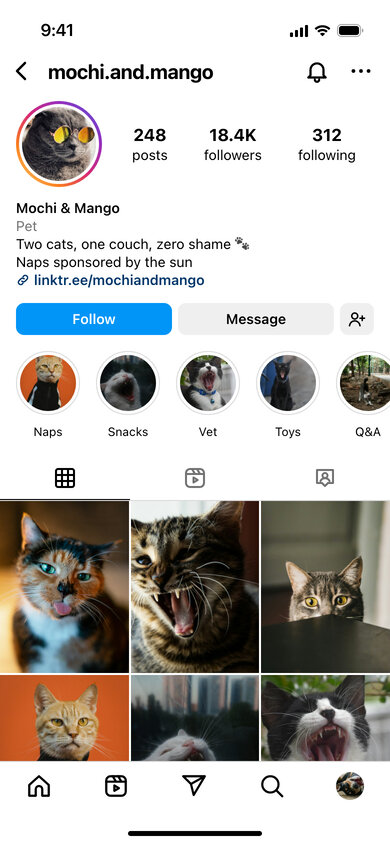
Instagram Profile Generator is a free tool that draws an Instagram profile page the way the iPhone app shows it, filled in with whatever you type. Upload a profile picture and up to twelve photos, write a bio, set the posts, followers and following numbers, and the page appears with the story ring, highlight circles, Follow and Message buttons and the photo grid underneath.
It is handy when you need the profile itself rather than a single post: pitching an influencer campaign before the account exists, showing a client how their feed could look, planning a grid, or making a mock account for a film, a class or a joke between friends. Nothing is posted anywhere and you do not need to log in to Instagram.
Every Part of the Profile Is Editable
- Header: username with an optional blue verified badge, and a colourful story ring around the picture when the account has an active story.
- Counts: posts, followers and following are free text, so "18.4K" or "2.1M" work exactly as Instagram abbreviates them.
- Bio: display name, a category label such as "Artist" or "Pet", several lines of text with emoji, and a link.
- Highlights: type up to five names separated by commas; each gets a cover from your uploaded photos.
- Grid: photos are cropped to the 3:4 portrait tiles Instagram now uses on profiles.
How to use Online Instagram Profile Generator?
- Fill in the username, name, category, bio and link, and upload a profile photo.
- Set the post, follower and following counts, and tick "Verified", "Story Ring" or "Following" as needed.
- Upload the photos for the grid and name the story highlights.
- Choose light or dark mode and the time shown in the status bar.
- Click "Export Screenshot" to download the profile as a JPG or copy it.
Frequently asked questions
How many photos can the grid show?
Twelve tiles fit on the screen, four rows of three. Upload up to twelve images; if you add fewer, they repeat to fill the grid, and with none you get coloured placeholders.
Why are the grid tiles not square?
Instagram switched profile grids from square to 3:4 portrait tiles, so the tool crops photos the same way. Portrait photos fit best; landscape ones are cropped at the sides.
Can I show the profile as someone who already follows it?
Yes. Tick "Following" and the blue Follow button turns into the grey "Following" button with a small arrow, as it looks to a follower.
What resolution is the screenshot?
The screen is drawn at 390 × 844 points, the size of a modern iPhone, and saved at double resolution — 780 × 1688 pixels — so it stays sharp in slides and posts.
Usage Policy
A convincing profile page can be used to pose as someone else, so by using Instagram Profile Generator by 10015.io you agree not to copy a real person's or brand's account to deceive people, not to fake follower numbers to win sponsorships or sales, and not to use the images in scams. Mockups, design pitches, education and obvious parody are welcome. The tool is not affiliated with Instagram or Meta, and 10015.io is not responsible for how the images are used.