
 Text Tools
 Image Tools
 PDF Tools
 Social Media Tools
 Security Tools
 Coding Tools
 CSS Tools
 Color Tools
 Miscellaneous Tools
 Add to Chrome
 Add to Firefox
Recreates a Snapchat conversation — chats, snaps, saved messages and screenshot notices — as an iPhone screenshot.
Chat
Messages
What is Online Snapchat Chat Generator?
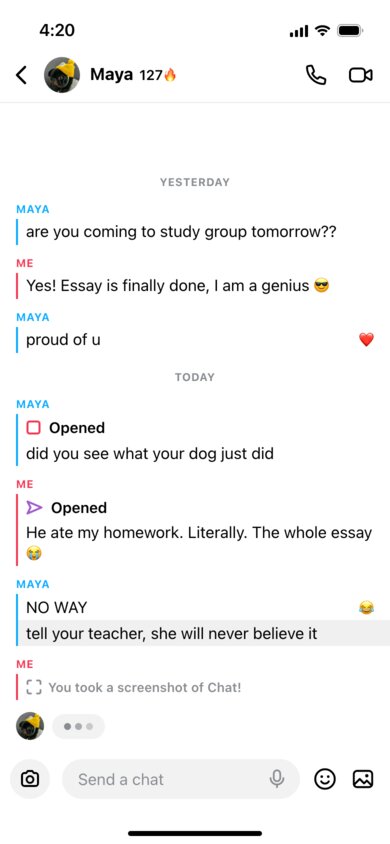
Snapchat Chat Generator is a free tool for making a screenshot of a Snapchat conversation that never happened. Snapchat chats look nothing like other messengers: there are no bubbles, each person's messages sit under their name in capitals — "ME" in red and your friend in blue — with a thin coloured line beside them, and snaps appear as little arrows and squares that say "Delivered", "Opened" or "New Snap". This tool draws all of that on an iPhone screen, with your friend's name, photo and Snapstreak in the header.
It is made for the things people actually do with Snapchat screenshots: memes, story-time videos, TikTok skits, comic strips, school projects about online safety, or just a joke at a friend's expense. Nobody receives anything and your Snapchat account is never touched.
More Than Text Messages
Every line in the conversation can be one of three things:
- Chat message — plain text, with an optional emoji reaction and a "Saved in Chat" option that gives it the grey background Snapchat uses for saved messages.
- Snap — a photo snap in red or a video snap with sound in purple. Snaps you send show an arrow ("Delivered", or hollow once "Opened"); snaps you receive show a square ("New Snap" or "Opened").
- Screenshot notice — the "You took a screenshot of Chat!" line, or the same alert with your friend's name, the most dramatic thing that can happen in a Snapchat chat.
Add date labels such as "Today" or "Yesterday" between messages, and switch on the typing indicator to leave your friend mid-reply at the bottom of the screen.
How to use Online Snapchat Chat Generator?
- Enter your friend's name, upload their photo or Bitmoji, and set the Snapstreak number.
- Choose light or dark mode and the time in the status bar.
- Build the conversation message by message: pick who sent it and whether it is a chat, a snap or a screenshot notice.
- Reorder messages with the arrows, add reactions, saved messages and date labels.
- Click "Export Screenshot" to download the PNG or copy it to the clipboard.
Frequently asked questions
What do the red and purple snap icons mean?
Red is a photo snap or a video without sound, purple is a video with sound. A filled icon means it has not been opened yet; an outlined one means it has. The tool lets you pick both the colour and the status for every snap.
Can I show the 🔥 Snapstreak?
Yes. Type a number in "Snapstreak" and it appears next to your friend's name with the fire emoji. Leave it empty if the two of you have no streak.
How many messages fit on the screen?
The screen is a fixed iPhone size, 390 × 844 points. Messages are anchored to the bottom like in the app, so if you write more than fits, the oldest ones scroll off the top, just as in a real screenshot.
Is my friend notified?
No. The tool has no connection to Snapchat at all — it only draws a picture in your browser. Nothing is sent, and no screenshot alert reaches anyone.
Usage Policy
Fake chats are a common tool for bullying and blackmail among teenagers, so please use Snapchat Chat Generator by 10015.io responsibly: do not put words in the mouth of a real person, do not use the images to embarrass, threaten or extort anyone, and do not present them as evidence. Comedy, storytelling, education and design work are welcome. The tool is not affiliated with Snap Inc., and 10015.io is not responsible for how the images are used.