
 Text Tools
 Image Tools
 PDF Tools
 Social Media Tools
 Security Tools
 Coding Tools
 CSS Tools
 Color Tools
 Miscellaneous Tools
 Add to Chrome
 Add to Firefox
Puts any photo inside the TikTok LIVE viewer screen, with host pill, viewers, comments and gifts, and exports it as an image.
Stream
Host
Gift Banner
Comments
What is Online TikTok LIVE Generator?
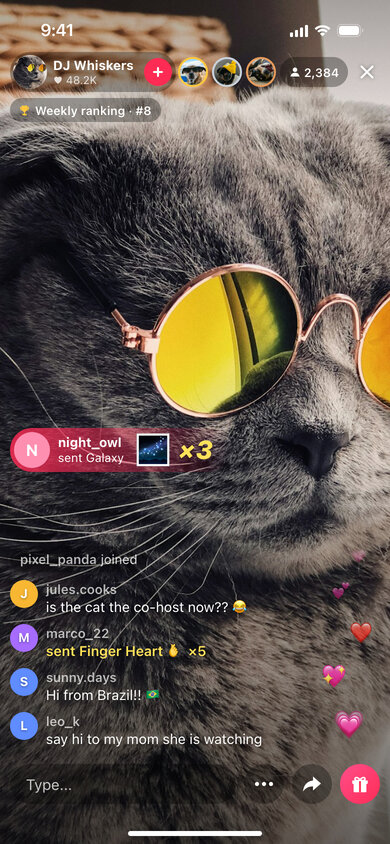
TikTok LIVE Generator is a free template for the TikTok LIVE screen as a viewer sees it. Upload a photo for the stream and the tool frames it with everything that makes a live broadcast recognisable: the host's name and like count with the pink follow button in the top corner, the three top gifters and the viewer count on the right, a ranking badge, the stream of comments and "joined" messages in the bottom left, a gift combo flying in, hearts floating up the side, and the comment box with the gift button at the bottom.
Streamers use it to make thumbnails and "going live tonight" announcements, agencies to pitch live-shopping concepts, and creators to fake a huge audience for a skit about becoming famous overnight. It also helps when you are writing a guide on how TikTok LIVE works and need a clean, anonymous screen to point at.
Comments, Joins and Gifts
The chat in the corner is built line by line, and each line can be one of three kinds. A comment shows the viewer's name in grey above their message. A joined line is the small "username joined" notice that pops up when someone enters. A gift line reads "sent Rose 🌹 ×5" in yellow. The gift list covers small gifts like the Rose, Finger Heart and Doughnut up to big ones like the Galaxy, Lion and Universe, and each viewer gets a coloured initial as an avatar.
For a bigger moment, fill in the gift banner: the sender's name, the gift and a combo count appear in the pink strip that slides across the stream, with the combo number in large yellow italics.
How to use Online TikTok LIVE Generator?
- Upload the stream image, or keep one of the coloured backgrounds.
- Set the viewer count, an optional ranking such as "Weekly ranking · #8", and up to three top viewer photos.
- Enter the host name, profile photo and like count.
- Write the comment feed and, if you like, a gift combo banner.
- Export the screenshot as a JPG or copy it to the clipboard.
Frequently asked questions
What are the coloured rings around the top viewers?
TikTok highlights the three biggest gifters of a LIVE with gold, silver and bronze rings. The first photo you upload gets gold, the second silver and the third bronze.
Can I make the stream look empty or huge?
Yes. The viewer and like counts are free text, so "3" and "1.2M" both work. Remove every comment line, the banner and the hearts for a quiet stream, or stack them up for a busy one.
What photo works best for the stream?
A vertical photo of a person or pet facing the camera, like a selfie, looks most like a real LIVE. Keep the face in the upper half, because the comments and buttons cover the bottom part of the screen. Landscape photos can be fitted with black bars instead.
What size is the screenshot?
It is an iPhone screen of 390 × 844 points exported at 2×, so the JPG is 780 × 1688 pixels — the right shape for stories, Reels and TikTok itself.
Usage Policy
By using TikTok LIVE Generator by 10015.io you agree not to fake a real creator's broadcast, not to show invented viewer or gift numbers to brands or agencies as proof of popularity, and not to use the images in giveaway scams or fake fundraisers, which are common on live platforms. Thumbnails, mockups, tutorials and comedy are fine. The tool is not made by or connected to TikTok or ByteDance, and 10015.io is not responsible for the images created with it.