
 Text Tools
 Image Tools
 PDF Tools
 Social Media Tools
 Security Tools
 Coding Tools
 CSS Tools
 Color Tools
 Miscellaneous Tools
 Add to Chrome
 Add to Firefox
Builds a Microsoft Teams desktop chat — one-on-one or group — from your own messages and exports it as a PNG.
Chat
Messages
Chat List
Other chats in the list, one per line: Name | last message | time
What is Online Teams Chat Generator?
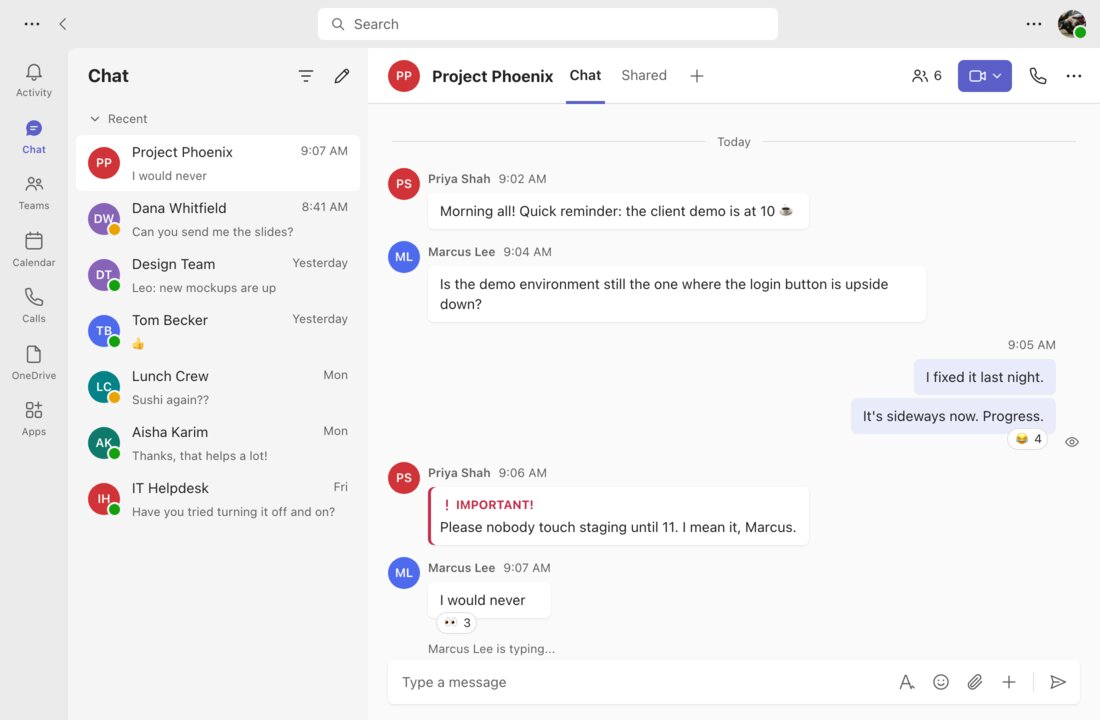
Teams Chat Generator is a free tool for mocking up a conversation in Microsoft Teams, laid out like the desktop app most offices use all day. On the left are the app bar (Activity, Chat, Teams, Calendar, Calls) and the list of recent chats; on the right, the open conversation, with other people's messages in white bubbles under their name and time, yours in light purple on the right, emoji reactions, and the "Type a message" box at the bottom.
Office humour lives in screenshots like these — the reply-all disaster, the manager who says "quick question", the meeting that could have been a message — and Teams chats are the place it happens. The tool is just as handy for serious work: onboarding guides, internal communication training, slides about collaboration tools, product mockups for Teams integrations, and scenes in videos set at work. It never connects to your Microsoft account.
Group Chats and One-on-Ones
Pick a group chat and give each message its own sender: every name gets a coloured circle with initials, the header shows the group name and how many people are in it, and consecutive messages from the same person are joined the way Teams joins them. Pick one-on-one and you can upload the other person's photo and set their presence — Available in green, Busy in red, Away in yellow, or Offline.
The Details That Make It Look Like Work
- Important — the red "IMPORTANT!" label and stripe Teams adds to urgent messages.
- Edited — the small grey note next to the time.
- Reactions — type an emoji and a count such as "👍 3" and it appears as a chip under the message.
- Seen — the eye icon beside your last message once it has been read.
- Typing indicator — "Marcus is typing..." above the message box.
- Chat list — other conversations down the side, written one per line.
How to use Online Teams Chat Generator?
- Choose a group chat or a one-on-one and name it; for a one-on-one, add a photo and a status.
- Enter your own name and photo, and pick light or dark mode.
- Add the messages, setting who sent each one, the time, reactions, and the Important or Edited flags.
- Fill in the chat list or untick "Sidebar & Chat List" for a narrower conversation-only image.
- Click "Export Screenshot" to download a PNG or copy it.
Frequently asked questions
Can I hide the sidebar and the chat list?
Yes. Untick "Sidebar & Chat List" and the image is cut down to the conversation itself, 780 pixels wide instead of 1100, which is easier to read when shared on a phone.
Does it show the dark theme?
Yes, switch the theme to Dark for the near-black Teams look, with your messages in deep indigo instead of light purple.
What happens if there are too many messages?
The window has a fixed desktop size of 1100 × 720 pixels and the conversation sticks to the bottom, so the newest messages are always visible and older ones disappear off the top — just like scrolling in the real app. The PNG is exported at twice that size.
Is this an official Microsoft product?
No. It is an independent tool that imitates the look of Microsoft Teams. It is not made, endorsed or supported by Microsoft, and it cannot read or send real Teams messages.
Usage Policy
Workplace chats can affect people's jobs, so please do not use Teams Chat Generator by 10015.io to invent messages from real colleagues, managers or clients, to fake approvals or instructions, or to submit a made-up conversation as evidence in an HR, legal or other dispute. Phishing that imitates internal messages is also off limits. Training material, mockups, comedy and clearly fictional scenes are welcome. 10015.io is not responsible for how the images are used.